
URA on Seed Funding Changes
We are announcing a brand new workflow on the Seed Funding website to enhance the application process for University Research Awards specifically. These updates are designed to streamline the application process and enhance your experience as you seek funding for your research initiatives.
Key changes and enhancements to Seed Funding
SeRA Integration
- Seed Funding will now help program managers identify their opportunities as University Research Awards (URA).
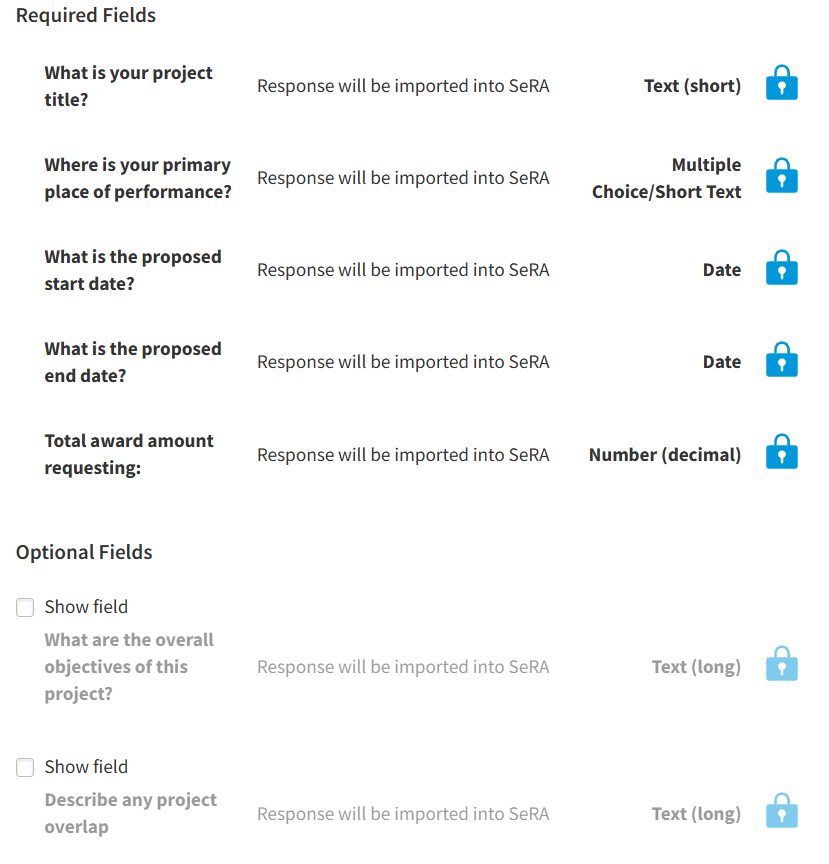
- If the opportunity is identified as a URA, applicants will automatically be asked the following questions:
-
- The answers to these questions will display on the PI's Disclosures/Current and Pending Support report in SeRA.
- Once the program manager closes the opportunity, all associated Seed Funding URA proposal entries in SeRA will be deleted so the awardee can initiate, complete and route a URA Proposal Development Routing Form (PDRF) in SeRA to create the URA project record and award setup in SeRA.
PI Eligibility
- Seed Funding will now identify whether the PI on an application is part of the Academic Council or University Medical Line.
- If the PI is not part of either, it will ask the applicant for a department chair name and contact and a department chair delegate name and contact.
- When the program manager is in the finalist stage of selecting awardees, they will trigger an approval request to go out to the department chair and delegate to verify the eligibility of the PI.
- The department chair or delegate will be able to approve or deny the eligibility with the click of a button through their email.
- The program manager will see the department chair or delegate’s decision and make their awards decision based on eligibility.
Who does this new workflow benefit
- Support for Applicants: By integrating Seed Funding (SF) with the SeRA system, there will be reduced administrative burden and enhanced compliance through transferring URA proposal information from SF to the Disclosures/Current and Pending Support report in SeRA.
- Support for Program Managers: By refining the application process, we aim to better assist program managers in handling PI exception requests. This will help clarify scenarios where ineligible individuals apply for funding opportunities, ensuring a smoother evaluation process and more transparent decision-making.
- Support for Research Administrators: Submitted SF URA applications will have their responses automatically uploaded to SeRA. If the applicant requires a PI exception approval, the Program Manager will be able to provide that to the applicant to upload to SeRA.
- Streamlined approval process for Department Chairs or Delegates: Department chairs will now be able to approve PI exception requests by following a link and with a click of one button via an email.
What does this mean for you?
If you are a Program Manager or Research Administrator that manages a URA, we highly advise you to review these how-to’s:
- Program Officer : Create and Publish University Research Opportunity
- Applicant : Submit a URA Application
- Program Officer & Dept. Chair : Application Review for PI Waivers
If you are an applicant of a URA that uses Seed Funding, please understand that your application entry will be shown on the Disclosures/Current and Pending Support report in SeRA 24 hours post-submission.
If you are a Department Chair or Department Chair Delegate, you will be able to provide approvals simply through Seed Funding now.
These enhancements will be available starting May 15th, 2026.
Although using the Seed Funding (SF) application is not mandatory, it is strongly recommended due to the integration between SF and the SeRA system. Otherwise URA application/proposal information must be managed manually by investigators and supporting administrators for inclusion on investigator Current and Pending (Other) Support (CPOS) forms for federal proposals (and non-federal, as required) to be in compliance. Additionally, if your PI needs a PI exception, it would need to be requested via email rather than through SF.